What Cowork is
Cowork is a research-preview mode in Claude Desktop that brings Claude Code’s agentic architecture into a simpler interface for knowledge work, so Claude can run long, multi-step tasks and write real outputs directly to your filesystem.
That last part matters: Cowork is designed to produce artifacts, not just answers.
Examples of what “artifacts” means in practice:
- A cleaned dataset plus a workbook with formulas and charts
- A client-ready report with consistent headings and citations
- A presentation deck generated from notes, transcripts, and a brief
- A reorganized folder structure with renamed files and an index
Cowork explicitly calls out polished outputs like Excel spreadsheets with working formulas and PowerPoint presentations, not just copied text.
How Cowork actually runs your tasks
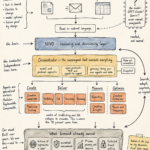
Under the hood, Cowork is a loop. It behaves less like a chat thread and more like a small “project runner”:
1) You set scope
- You choose a folder (or folders) Cowork can work in.
- You can set global instructions (always apply) and folder instructions (project-specific).
- You choose a folder (or folders) Cowork can work in.
- You can set global instructions (always apply) and folder instructions (project-specific).
2) Claude proposes an approach
- Cowork starts by analyzing your request and generating a plan you can review before it runs.
3) It breaks work into subtasks
- For complex jobs, Cowork decomposes the work and can coordinate parallel workstreams.
4) Execution happens in an isolated environment
- Cowork runs on your computer and executes work in a virtual machine environment (VM). This isolates execution from your main OS, while still allowing real file changes in the locations you permitted.
5) Outputs land directly in your folder
- Cowork writes finished files to your filesystem, so your “deliverable” is a document, spreadsheet, deck, or organized directory you can immediately use.
6) You can steer mid-flight
- You can intervene during execution to course-correct, add constraints, or provide missing inputs. Cowork surfaces progress indicators so you can see what it is doing.
Two practical implications:
- Cowork is built for long-running tasks, not quick Q&A.
- The Claude Desktop app needs to remain open while it works, otherwise the session ends.
The “sub-agent” idea: why Cowork scales better than a single chat
A normal chat thread accumulates everything in one context window. That becomes a problem when the task is large, multi-source, and multi-output.
Cowork can “spin up sub-agents” that work in parallel, each starting with clean context, then syncing results back into the main task. This is a key reason Cowork handles bigger jobs without turning into a single, bloated conversation.
If you have ever watched an AI get worse as a thread gets longer, this is the architectural response.
Plugins: the enterprise unlock (skills + tools + agents in a bundle)
Cowork is powerful out of the box, but plugins are how it becomes role-specific.
Anthropic describes Cowork plugins as bundles that can include:
- skills
- connectors (via MCPs)
- slash commands
- sub-agents
All packaged into something you install and customize.
This matters because most “AI rollouts” fail for a simple reason: generic assistants do not fit real workflows. Plugins push Cowork toward repeatable operating patterns inside a company.
Anthropic has also pointed to open-sourcing starter plugins to accelerate adoption across functions (productivity, marketing, support, data analysis, biology research, etc.).
If you want a concrete mental model: Cowork is the execution runtime. Plugins are job descriptions plus tooling.
Important nuance about “memory”
Cowork itself lists a current limitation of no built-in memory across sessions. However, plugins can implement “persistent context” by writing and reading local files (task lists, notes, dashboards) that Cowork can reuse next time because they live in the working folder. This is exactly how the Productivity plugin describes building persistent understanding through maintained artifacts like a markdown task list and local “workplace memory.”
So: not magical memory. Practical, file-based continuity.
MCPs and connectors: how Cowork reaches your systems
Cowork can be extended with desktop extensions called MCPs. MCPs are the connector layer that lets Claude safely interface with external tools and services.
The Cowork help docs explicitly call out that you control which MCPs you connect and how permissions behave, and they advise being especially cautious with unfamiliar MCPs because they expand the attack surface.
If you are explaining Cowork to a business audience, this is the clean framing:
- Cowork is not “logging into everything.”
- Cowork is “granted specific capabilities via connectors,” and each connector has to earn trust.
Safety and governance: what to take seriously
Cowork is agentic. Agentic tools bring different risks than chatbots, mainly because they can act.
Anthropic highlights several key safety and governance realities:
1) Prompt injection risk is real
Cowork has unique risks due to its agentic nature and internet access, and Anthropic explicitly calls out prompt injection as a non-zero risk.
2) Be selective with file access
Cowork can read, write, and (with permission) delete files. Best practice is to use a dedicated working folder and keep backups.
3) Deletion requires explicit permission
Cowork includes deletion protection: it requires explicit user approval before permanently deleting files.
4) Team and Enterprise caveats are significant
For Team and Enterprise plans, Cowork usage is not captured in Audit Logs, Compliance API, or Data Exports, and conversation history is stored locally on users’ computers. It also lacks role-based access controls at launch. This is why the help center warns not to use Cowork for regulated workloads if you require audit trails.
This is the sentence I would put in front of any security leader: Cowork is powerful, but it is not a compliance product yet. Treat it like a research preview runtime that needs guardrails.
When to use Cowork vs Chat vs Claude Code
A simple rule:
- Chat: when you need fast thinking and text.
- Cowork: when you need a finished deliverable across many steps and files.
- Claude Code: when the work is primarily software engineering inside a dev environment.
Cowork is explicitly positioned as Claude Code’s execution power without the terminal, for knowledge work.
Real-world workflows (prompts that behave like “delegation”)
A good Cowork task prompt has five parts:
- Outcome
- Inputs (what folder, what files)
- Constraints (format, tone, length)
- Definition of done (what outputs should exist)
- Guardrails (what it must not do)
Examples:
Marketing “Work in the folder ‘Launch-Feb’. Read the brief, last quarter’s results, and the customer FAQs. Create: (1) a messaging framework, (2) a 6-week content calendar in Excel with owners and statuses, and (3) a 12-slide deck outline. Use our brand voice doc. Do not publish anything or overwrite existing files.”
Finance “Work in ‘FP&A-Q1’. Ingest the CSV exports, reconcile categories, and build an Excel model with a summary tab, assumptions tab, and variance analysis with charts. Flag anomalies and write a one-page narrative for the CFO.”
Product “Work in ‘Discovery-Interviews’. Cluster interview transcripts, extract top themes with supporting quotes, and generate a PRD draft plus a roadmap table. Create a ‘Questions’ file for missing info.”
These are the kinds of tasks where “chat” becomes a copy-paste marathon, and Cowork becomes a production tool.
Practical setup: how to start without blowing up your workflow
- Create a dedicated folder: /Workroom/ProjectName
- Put only the minimum necessary inputs inside
- Add a short folder instruction file (voice, formatting rules, naming conventions)
- Start with a narrow deliverable (one report, one spreadsheet, one deck)
- Expand scope only after you trust the pattern
Anthropic’s own safety guidance strongly aligns with this “workroom folder” model and cautious permissioning.
The bigger point
Cowork is a signal that AI UX is moving away from conversation as the primary interface.
The winning pattern for business is:
- Delegate outcomes
- Let the system orchestrate work
- Get artifacts back
- Repeat with standard operating procedures (often via plugins)
That is what “AI as a coworker” becomes when it is designed to execute, not just respond.